Nobody decides to have bad posture. It happens one forwarded head, one rounded shoulder at a time, until standing up straight feels like a workout. I realized how bad mine had gotten when a candid photo showed me shaped like a shrimp at a wedding — while everyone else stood like humans. If you’re wondering how to improve your posture while sitting at a computer all day, the good news is you don’t need a $1,500 ergonomic chair or heroic discipline. You need a decent setup and a few habits that run on autopilot.
Here’s the reframe that changed everything for me: posture isn’t about sitting like a statue. It’s about setting up your environment so good posture is the path of least resistance, then moving often enough that no single position wrecks you. Let’s build that.
How Can I Improve My Posture While Sitting at a Computer All Day? Fix the Chair First
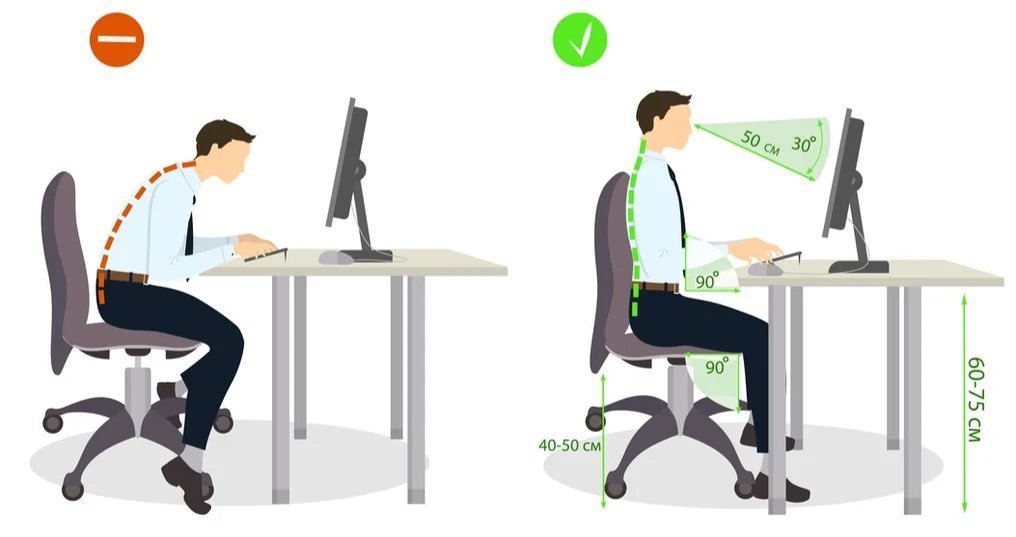
Your chair does 80% of the work, so let’s get it right. Sit with your back against the backrest — scooting forward to perch on the edge is the original sin of desk posture. Your feet should rest flat on the floor (or a footrest; a $15 one or a sturdy box works), knees at roughly 90 degrees, hips slightly above knees if possible. Your lower back needs support: the chair’s lumbar curve should fill the natural arch of your spine. No lumbar support? Roll up a towel and wedge it there. I used a towel for two years before buying a proper cushion, and honestly the towel worked fine.
Armrests should let your shoulders hang relaxed, not hitched up — if they’re too high, they push your shoulders toward your ears all day, which is a fast track to the neck pain we cover in the best stretches for neck pain from desk work. Elbows near 90 degrees, wrists straight and floating (not bent up or planted on the desk edge). And here’s the one most people miss: sit back far enough that your shoulder blades actually touch the chair. If your chair is too deep, a cushion behind your back fixes it. Total cost of this entire setup: somewhere between zero and forty dollars.
Screen, Keyboard, and the 90-Degree Rule
Your monitor is probably too low. Almost everyone’s is. The top of your screen should sit at or just below eye level, about an arm’s length away — close enough that you’re not leaning in to read. Laptop users, this means you: a laptop on a desk guarantees downward head tilt, which loads your neck with the equivalent of extra weight for every inch your head drifts forward. A laptop stand plus an external keyboard is the single highest-value upgrade in all of ergonomics, usually under $50 total.
Keyboard and mouse go at elbow height with wrists neutral. If your shoulders creep up while typing, your surface is too high — lower the chair and get a footrest, or raise the keyboard tray. Phone habits matter too: cradling a phone between ear and shoulder is a neck disaster, so use speakerphone or a headset for long calls. And lighting counts more than you’d think — squinting at a glare-heavy screen pulls your whole head forward. Position your monitor perpendicular to windows, not facing them or backing them.
- Monitor: top at/below eye level, arm’s length away
- Laptop: stand + external keyboard (non-negotiable for full-time use)
- Elbows ~90°, wrists straight, shoulders relaxed and down
- Phone: headset or speaker — never shoulder-cradle
- Screen perpendicular to windows to kill glare-driven hunching
The Micro-Habits That Beat Any Chair
Even perfect ergonomics fail if you freeze in one position for eight hours. Your spine loves variety — the goal is dynamic sitting, not perfect stillness. Set a timer to stand, walk, or stretch every 30–60 minutes. I do 30 minutes because my body complains loudly by minute 45; find your number. Walk to get water, take calls standing, do ten bodyweight squats between meetings. These micro-breaks matter more than any single ‘correct’ position.
Build posture checks into existing habits: every time you hit send on an email, roll your shoulders back once. When your coffee arrives, do five chin tucks. Stack the new habit on an old one and it sticks without willpower. Strengthening helps too — rows, face pulls, and reverse flys (even with light dumbbells or bands, twice a week) build the upper-back muscles that hold you upright, while planks train the core that supports your spine. And if back pain is already part of your life, how to know if your back pain needs a doctor or just rest is worth a read before you start any new exercise routine.
Standing Desks, Gadgets, and What’s Actually Worth Buying
Let’s talk gear honestly. Standing desks are great — if you alternate. Standing all day just trades sitting problems for standing problems (hello, sore feet and varicose veins). The research sweet spot is switching every 30–60 minutes. A manual sit-stand converter for $100–200 beats a $700 electric desk if budget matters; both beat sitting all day. Posture-correcting braces and ‘smart’ vibrating trainers? Mostly gimmicks. Braces weaken the muscles they’re supposed to train if worn constantly, and buzzing gadgets end up in drawers within a month.
What actually earns its money: a laptop stand, an external keyboard and mouse, a lumbar cushion or towel, and maybe a footrest. That’s the whole list. Everything else is optimization. The CDC’s ergonomics resources back up the fundamentals here — neutral postures, regular movement breaks, workstation adjustability — without trying to sell you anything, which is more than I can say for most posture-gadget ads.
The 2-Week Posture Reset
Don’t overhaul everything Monday morning — you’ll last until Wednesday. Instead: week one, fix the chair and screen height. Week two, add the 30-minute movement timer and one strengthening session. Photograph your side profile at your desk on day one and day fourteen; the difference will motivate you more than any article can.
Good posture isn’t a pose you hold. It’s an environment you build and a habit of moving. Set up the chair, raise the screen, stand up often, and let your shrimp days stay in the wedding photos where they belong.